

🧮
Six kinds of metric
Counters for things you tally, gauges for values you sample, levels for a number that rises and falls, events and logs for records you keep whole, timers for how long work takes.
Compare them
A small TypeScript library that counts things, records events and times operations. You can read the numbers live, and it hands you finished rows to store however you like.
import { counter, createHouse, str } from 'metrichouse/core'
import { memory } from 'metrichouse/memory'

// 1. Say what you want to measure.
const pageViews = counter('page_views', {
  dims: { path: str() },
  resolution: '1m',                       // keep one row per minute
  flush: '5m',                            // ship no more than once every 5 minutes
  write: async (rows) => {
    await db.insertInto('page_views').values(rows).execute()
  },
})

// 2. Connect it to somewhere that holds the running totals.
const house = createHouse({ driver: memory(), schema: { pageViews } })
house.start()

// 3. Count.
pageViews.add({ path: '/pricing' })

// 4. Read it back straight away, before anything reaches the database.
await pageViews.current({ path: '/pricing' })   // 1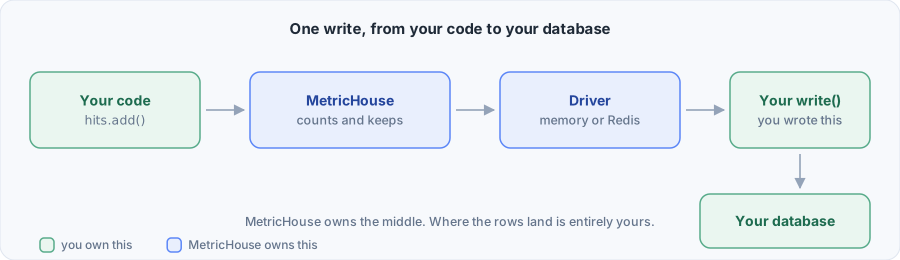
Adding analytics to a project usually means adopting someone else's stack: a hosted service that keeps your data, a cluster you run yourself, or a collector service to feed. Those tools expect to be chosen early, and fitting one into an application that already exists is hard.
MetricHouse is a TypeScript library that runs inside your own code. You call add() wherever something happens. It groups those calls into time windows and keeps a running total for each one, which your code can read at any moment. When it is time to write, it hands your function finished rows to store however your storage needs. Querying, charting and long term storage stay with the tools you already use.
If you want a full explanation of the idea before writing code, read What MetricHouse is. If you would rather see it running, go to Getting started.
npm install metrichouseNode 20 or newer. The ioredis package is optional and only needed if you use the Redis driver.