

dims
dims are the labels a folded metric breaks its number down by. You declare them once, and every write, every live read and every stored row carries them.
import { counter, oneOf, str } from 'metrichouse/core'

const httpRequests = counter('http_requests', {
  dims: {
    route: str(),
    status: oneOf(['2xx', '3xx', '4xx', '5xx']),
  },
  resolution: '10s',
  flush: '1m',
  write,
})

httpRequests.add({ route: '/checkout', status: '2xx' })
This page is the whole of dims: the declaration, the argument at each call site, the series key underneath, what it costs, and every error it can raise.
Where dims appear
| Metric type | Declares dims | The argument |
|---|---|---|
counter | yes | add(), current() |
gauge | yes | set(), current() |
level | yes | set(), inc(), dec(), current() |
timer | yes | start(), end(), time(), observe() |
event | no | declares fields instead |
log | no | declares fields instead |
Every metric that folds writes into time windows takes dims. The two types that keep each record whole take fields, which allow values that are unique per record. fields covers the difference in full.
snapshot({ dims }) accepts them as a filter on every type that declares them. That option lives in Snapshot options.
Declaring dims
dims is an object. Each key is a column name, and each value is a field type.
dims: {
  route: str(),
  status: oneOf(['2xx', '3xx', '4xx', '5xx']),
  cached: bool(),
}| Property | Value |
|---|---|
| Type | Record<string, FieldType> |
| Required | no |
| Default | {}, a metric with a single series |
| Checked | when the module is imported |
Leave dims out entirely for a metric that is one number.
const jobsProcessed = counter('jobs_processed', { resolution: '1m', flush: '1m', write })

jobsProcessed.add()
jobsProcessed.add(5)
await jobsProcessed.current()
Which types are allowed
Six of the seven field types are legal as a dim.
| Builder | Legal as a dim | Stored in the key as |
|---|---|---|
str() | yes | the string itself |
int() | yes | the number, written out |
float() | yes | the number, written out |
bool() | yes | 'true' or 'false' |
ts() | yes | epoch milliseconds |
oneOf([...]) | yes | the member, written out |
json<T>() | no | rejected at declaration |
json() is refused because a payload has no single short form that identifies a series. Put it on an event field instead.
dims: { metadata: json() }
// Error: http_requests: dim "metadata" declares json(), which cannot be encoded
// into a series key. Put it on an event instead
Names a dim cannot take
A dim becomes a column of every row, beside the columns the metric writes itself, so it cannot share a name with one of them.
| Metric type | Columns a dim cannot be named |
|---|---|
| counter, level | id, bucket_ts, value |
| gauge, timer | id, bucket_ts, and each aggregate the metric ships |
| timer | duration_ms as well, the field a timing carries onto its record event, and ts, _ingested_at and _sample_rate, the columns that event writes on every row |
A dim sharing a name with a column would overwrite it or be overwritten by it. A dim named id would replace the row id, and every window of the series would ship with the same id.
dims: { value: str() }
// Error: http_requests: dim "value" is a reserved column. MetricHouse writes
// [id, bucket_ts, value] on every row
A gauge that leaves an aggregate out of aggregate can use its name for a dim, because no column of that name is written.
More names are refused on every type. bucket_open and bucket_elapsed_ms are columns every row snapshot() returns, and a dim of either name would be overwritten there. __proto__ sets an object's prototype rather than adding a key, so no row could carry it. A name that reads as a whole number, such as '2024', is listed by JavaScript before every other key whatever order you wrote it in, so the declared order would be lost. 'y2024' or '01' keep their place and are accepted.
Optional dims
.optional() lets a call site leave the key out, and the row then carries no value for it.
dims: { plan: oneOf(['free', 'pro']), campaign: str().optional() }

signups.add({ plan: 'pro' })                      // campaign is absent
signups.add({ plan: 'pro', campaign: 'launch' })  // campaign is 'launch'
An absent optional dim is its own series, separate from the series where the same dim holds an empty string. The two can never collide, because the key marks absence with a sentinel no real value can produce.
Dims with a default
.default(value) lets a call site leave the key out, and fills the value in.
dims: { plan: oneOf(['free', 'pro']), referrer: str().default('direct') }

signups.add({ plan: 'pro' })                      // referrer is 'direct'
signups.add({ plan: 'pro', referrer: 'twitter' })
The default is checked against its own type at declaration, so a wrong one fails when the file is imported.
int().default('five')
// Error: default for int(): expected a safe integer, got "five"
Only a genuinely missing key is filled in. A falsy value you passed on purpose, such as 0 or '', reaches the row untouched.
Prefer .default() on a dim and .optional() on an event field. Every row then carries a value, so grouping in SQL behaves the same for every series.
Declaration order
The order you write the keys in is the order everything downstream uses: the series key, the columns in rowShape(), and the columns your sink receives.
httpRequests.rowShape().columns.map((c) => c.name)
// ['id', 'bucket_ts', 'route', 'status', 'value']
Add new dims at the end. Reordering is a breaking change.
The dims argument
Every write method on a folded metric takes the declared values as its last argument. Two rules decide whether you may leave that argument out, and they differ by method.
When the argument is required
add(), set(), inc() and dec() require the argument as soon as the metric declares one dim, whatever modifiers those dims carry. So does current() on a gauge, a level or a timer. A counter's current() is the one exception: left without it, it returns the total across every series.
const signups = counter('signups', {
  dims: { campaign: str().optional() },
  resolution: '1m',
  flush: '1m',
  write,
})

signups.add({})                  // every key is optional, so an empty object
signups.add({ campaign: 'x' })
signups.add()
//        ^ Type error: expected 1 argument
A metric that declares no dims takes no argument at all.
jobsProcessed.add()
jobsProcessed.add(5)
The rule is deliberately blunt. A metric with dims makes the argument visible at every call site, which is where a reader decides whether the label is right.
When the argument may be left out
handle.end(), timer.observe(), timer.time() and the log level methods use a looser rule: the argument may be left out once nothing in the shape is still required.
const httpLatency = timer('http_latency', {
  dims: { route: str(), status: oneOf(['ok', 'error']) },
  resolution: '10s',
  flush: '1m',
  write,
})

const span = httpLatency.start({ route: '/checkout' })
span.end({ status: 'ok' })       // route was bound at start, status is still required

const both = httpLatency.start({ route: '/checkout', status: 'ok' })
both.end()                       // nothing left to supply
start() marks the keys it bound as omittable for that handle. A key given at the end overrides one bound at the start, because the end of an operation knows more than its beginning did.
Reading dims for a partial value
start() accepts any subset of the declared dims and checks what you gave it. A key that is not declared throws there, and a required key that is still missing throws at end(), where it is the last chance to supply one.
httpLatency.start({ rout: '/checkout' })
// Error: http_latency: unknown dim "rout". The declared dims are [route, status]

httpLatency.start({}).end({})
// Error: http_latency: missing required dim "route"
The series key
One combination of dim values is one series. MetricHouse encodes that combination into a single string, the series key, and stores one running total per key per time window.
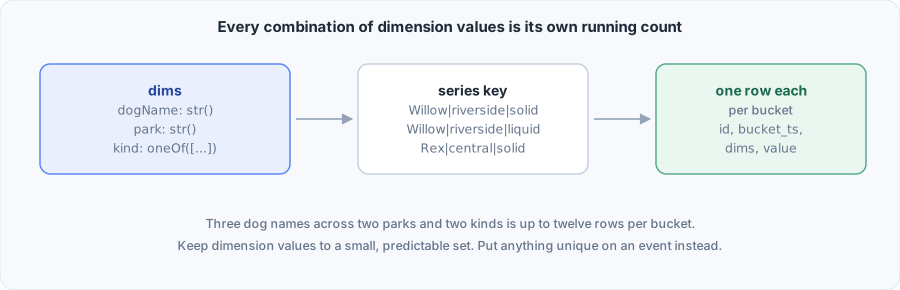
{ route: '/checkout', status: '2xx' }   ->   /checkout|2xx
{ route: '/pricing',  status: '4xx' }   ->   /pricing|4xx
Three rules govern the encoding.
| Rule | Detail |
|---|---|
| Order | Values are written in declaration order, joined by | |
| Escaping | A | or a \ inside a value is prefixed with \, so a value containing the separator still parses |
| Absence | An omitted optional dim is written as \0, which escaping makes unreachable for a real value |
You never handle the key yourself. It is worth knowing because it explains the two consequences below, and because rowId() hashes it when it mints the id for a row.
Reordering is a breaking change
Rows written before a reorder were keyed in the old order, and rows written after it are keyed in the new one. The two sets never match, so a query that groups across the change sees two populations.
Treat a reorder the way you would treat a column rename in a database. Adding a dim at the end leaves the rows already stored readable by a process on the new declaration, and they carry no value for it. During a rolling deploy, a process still on the old declaration finds keys with an extra value that it cannot decode. It reports each to onError and ships it as stored, as Keys the declaration cannot read describes. Read Changing a schema with data in storage before deploying it.
That includes windows still waiting in the driver when the new declaration deploys, such as a Redis full of totals written by the previous release. Their series ship with the new dim left off the row, under the id they already had, so a series written in the same window by the new release is a second row beside it rather than the same one. A level ships such a series for the windows it was written in and stops there. It does not carry the series forward beside the one that replaced it.
A metric that had no dims and gains some follows the same rule, with one exception. Its single series was stored under an empty key. When the only dim declared is a str(), or a oneOf() that lists '', the value '' encodes to that same empty key, and the two cannot be told apart. That series then reads back with the dim set to ''. With two dims or more, or one dim of any other type, it reads back with every dim left off.
Keys the declaration cannot read
A stored key outlives the declaration that wrote it. The current declaration cannot decode a key when:
- a dim was removed, so the key holds more values than the declaration names
- a dim changed type, such as a
str()turned into anint()that holds"abc" - a
oneOfmember was removed, so a stored value is no longer one of the members - a dim that is now required or has a default was stored as absent
A number or a timestamp is decoded only from the text MetricHouse writes for it. 7 reads back as 7, and 007, +7, 0x7, 7.0 and 1e1 do not.
Such a key never stops a flush or a snapshot. The series ships in the same batch as every other series of the metric, under the id its key already gave it, and its row is built from what is stored:
- A dim the declaration can read comes back as its declared type.
- A dim it cannot read holds the stored text of that value, with its escapes undone. A dim declared as
int()then holds a string in that row. - A dim stored as absent is left off the row.
- A value past the last declared dim has no dim to belong to, so it is left off the row.
The row your write function receives can therefore break the types the metric's row promises, such as a string in a column declared int(). A sink that inserts into a typed table may reject that batch. The claim then fails and is retried like any other sink failure, and since the key is still stored the same way, it fails again on every flush and holds up every series shipped with it. Change a dim in a way that accepts what is already stored, or let every window written under the old declaration ship before the deploy that changes it, and the question never comes up.
snapshot() returns the same rows a flush ships. A snapshot that merges series, with groupBy or a rollup, tells such a series apart from others by its stored key rather than by its values. Its values can read the same as those of a series written since, when the value it has past the last dim is left off, and it is still a series of its own: a level adds the latest value of each, and a gauge leaves last off a window both of them hold.
Each such key is reported to onError once per process, however often it is flushed or read, so a snapshot polled every second does not repeat it. The error names the metric, the dim, the stored text and the reason:
orders: stored series key "abc" cannot be read under the current dims: dim "count" is declared as int(), but the stored value "abc" is not a safe integer. The stored series was written under an earlier declaration. It ships with the stored text as each unreadable dim's valueA key with more values than dims reports expected at most 2 segments for [route, status], got 3, and one stored as absent for a dim that is required now reports dim "status" is required now.
A process remembers 10,000 reported keys per metric. The first unreadable key past that is reported once more, for all of them, and no key after it is reported by that process:
orders: more than 10,000 stored series keys cannot be read under the current dims. Each ships with the stored text as each unreadable dim's value, and no more are reportedThe report is made only when the house has an onError. Without one, nothing is raised, and the series ships as stored all the same.
A level does not carry or total such a series. It ships the windows the series was written in as stored, and stops there. totals() leaves it out. The windows stay stored until they are deleted from the driver.
Every combination is a running total
A metric keeps one total per key per window, so the number of series it can produce is the product of the sizes of its dims.
series        =  distinct values of dim 1  x  distinct values of dim 2  x  ...
rows per flush = series that were written to  x  buckets per flush
For resolution: '10s' and flush: '1m' there are six buckets per flush. Three routes, two methods and four status classes give twenty four combinations, so at most 144 rows a minute, which is nothing. Add a userId dim with a hundred thousand users and the same metric produces up to 600,000 rows a minute, which is a problem you will meet in your database bill.
Buckets and time covers the other half of that number, which is the resolution.
Choosing what to label
Use a dim when the set of possible values is small and you can name it in advance. Route patterns, country codes, plan tiers, status classes, queue names and boolean flags all qualify.
Keep anything unique per request or per person off a dim. User ids, request ids, session ids, raw URLs with query strings and email addresses all belong on an event, which is built to hold them.
// A dim: four values, forever.
dims: { status: oneOf(['2xx', '3xx', '4xx', '5xx']) }

// A dim: one value per URL ever requested, which grows without bound.
dims: { url: str() }
Two habits keep the count down:
- Label with the route pattern rather than the path.
'/users/:id'is one series.'/users/98421'is one series per user. - Label with classes rather than codes. Four status classes read the same on a chart as forty status codes, at a tenth of the rows.
The memory driver is the only one that stops you
memory() refuses a write past 100,000 distinct series for one metric, so a runaway dim fails loudly rather than exhausting the heap. ioredis() has no such cap, so the same mistake there shows up as memory use that climbs. The limit is maxSeries and you can raise it.
Reading dims back
A declaration is an ordinary value, so you can read it.
httpRequests.dims
// { route: FieldType, status: FieldType }

Object.keys(httpRequests.dims)
// ['route', 'status']

httpRequests.dims.status.values
// ['2xx', '3xx', '4xx', '5xx']
That makes a shape reusable. Declare it once and spread it wherever it belongs, which is how a timer and its sample event stay in step.
const REQUEST_DIMS = { route: str(), status: oneOf(['ok', 'error']) }

const httpLatency = timer('http_latency', { dims: REQUEST_DIMS, ...rest })

const httpLatencySamples = event('http_latency_samples', {
  fields: { ...httpLatency.dims, duration_ms: float() },
  ...rest,
})
naturalKey(dims) gives the columns your table should treat as unique for a folded metric.
import { naturalKey } from 'metrichouse/core'

naturalKey(httpRequests.dims)   // ['bucket_ts', 'route', 'status']
Filtering by dims
One series, live
current() takes the declared values and answers for that series alone.
await httpRequests.current({ route: '/checkout', status: '2xx' }) // 42A counter also answers without the argument, and then adds every series together. The other folded types answer per series, with totals() as the way to merge them.
A partial match on rows
snapshot({ dims }) matches on any subset of the declared dims.
await httpRequests.snapshot({ dims: { route: '/checkout' } })The match runs over materialised rows rather than over the key, so any subset works, in any order. Naming a dim the metric never declared throws, because a typo would otherwise match nothing and render as an empty chart.
Collapsing dims away
groupBy keeps the dims you name and merges the rest.
await httpRequests.snapshot({ rollup: 'sum', groupBy: ['route'], orderBy: 'value', limit: 10 })Both options are covered in full in Snapshot options.
Errors
Every check below runs before anything is written, so a rejected call leaves no half finished state behind.
| Message | Cause |
|---|---|
http_requests: dim "x" declares json(), which cannot be encoded into a series key | json() used as a dim. At declaration |
default for int(): expected a safe integer, got "five" | .default() given a value its own type rejects. At declaration |
http_latency: dim "duration_ms" is reserved, because it is the field a timing carries onto a record event | A timer dim using the name a timing carries onto its record event. At declaration |
http_latency: dim "ts" is reserved, because a record event writes a column of that name on every row | A timer dim using a column its record event writes on every row: ts, _ingested_at or _sample_rate. At declaration |
http_requests: dim "id" is a reserved column | A dim named after a column the metric writes itself. At declaration |
http_requests: a dim cannot be named "__proto__" | JavaScript treats that key as an object's prototype, so no row could carry it. At declaration |
http_requests: a dim cannot be named "2024" | A name that reads as a whole number, which JavaScript moves ahead of every other key. At declaration |
http_requests: a dim cannot be named "bucket_open" | A name every snapshot row already uses, and the same for bucket_elapsed_ms. At declaration |
http_requests: missing required dim "status" | A declared dim with no value and no default |
http_requests: unknown dim "pakr". The declared dims are [route, status] | A key that is not declared |
http_requests: route: expected a string, got 42 | A value of the wrong type |
http_requests: status: "200" is not one of ["2xx", "3xx", "4xx", "5xx"] | A value outside a oneOf set |
http_requests: occurredAt: expected a valid Date, got "2026-09-17" | A ts() dim given something that is not a Date |
http_requests: dims names "pakr", which is not a declared dim | A snapshot filter or groupBy naming an undeclared dim |
http_requests: dim value "a\ud800" holds half of a surrogate pair | A string cut in the middle of an emoji, which storage kept as UTF-8 could not tell apart from another |
memory driver: http_requests exceeded maxSeries (100000) | A dim with unbounded values, on memory() |
Related
- Field types for each builder and its modifiers
- fields for the event and log equivalent
- Snapshot options for reading dims back as rows
- Buckets and time for the other half of the row count