

Getting started
This page builds a working metric from nothing. It takes about five minutes.
Install
npm install metrichousepnpm add metrichouseyarn add metrichouseYou need Node 20 or newer. Nothing else is required to start.
Step 1: declare a metric
A metric is a plain value you export from a file. Declaring one does nothing on its own. It opens no connections, starts no timers and touches no storage.
// metrics/schema.ts
import { counter, str } from 'metrichouse/core'

export const pageViews = counter('page_views', {
  // The labels you want to break the number down by.
  dims: { path: str() },

  // Keep one row per path per minute.
  resolution: '1m',

  // Never ship more often than once every five minutes.
  flush: '5m',

  // The one function you write. MetricHouse calls it with finished rows.
  write: async (rows) => {
    console.log(rows)
  },
})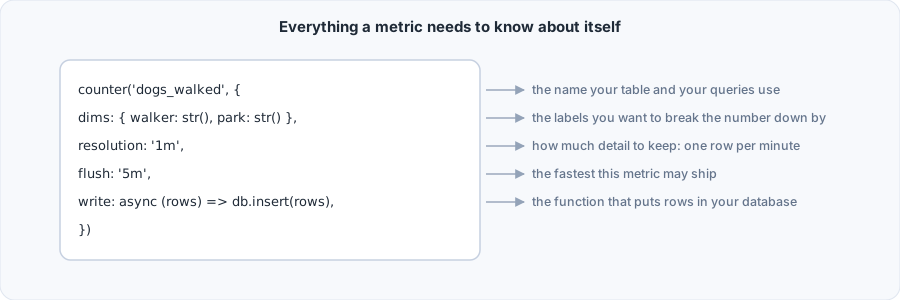
Four things are worth noticing:
resolutionis how much detail you keep. One row per minute here. Set it to'1s'and you get one row per second.flushis how often rows leave. These are separate settings. See Buckets and time.writeis required. A metric that measures something and ships it nowhere is almost always a mistake, so the type system will not let you declare one.dimsis optional. Leave it out for a metric that is a single number. dims covers what makes a good label and what one costs.
Step 2: create a house
A house connects your metrics to somewhere that can hold running totals. That somewhere is called a driver. The memory() driver keeps everything in plain JavaScript maps and is the right choice for a single server.
// metrics/house.ts
import { createHouse } from 'metrichouse/core'
import { memory } from 'metrichouse/memory'
import * as schema from './schema.js'

export const house = createHouse({
  driver: memory(),
  schema,
})
Passing the whole imported module is deliberate. The house picks out the metrics and ignores every other export, so you never maintain a list by hand.
Until a house registers a metric, writing to it throws. That is on purpose: a metric that silently drops data because you forgot to register it is far worse than one that fails loudly at startup.
Step 3: write to it
import { pageViews } from './metrics/schema.js'

pageViews.add({ path: '/pricing' })
pageViews.add({ path: '/pricing' })
pageViews.add({ path: '/docs' })
add() returns immediately. It does not wait for storage, and it never throws because storage was slow.
Step 4: read it back
You do not need to wait for a flush to see the numbers.
await pageViews.current({ path: '/pricing' })   // 2
await pageViews.current()                       // 3, every path added together
This reads the window that is still filling, so it is live.
Step 5: get the rows out
// Run this once the minute the writes landed in has ended, and its grace with it.
const report = await pageViews.flush()
// { buckets: 1, rows: 2, skipped: false }
Called right after add(), the same line returns { buckets: 0, rows: 0 }, because the minute is still open. The tip below shows how to get past that in a test. Once the minute has closed, your write function runs with an array that looks like this:
[
  {
    id: '4f2c18a6e1d9b0c73a5e8f21b6d40c99',
    bucket_ts: 2026-09-17T14:03:00.000Z,
    path: '/pricing',
    value: 2,
  },
  {
    id: 'a91e5b7c2d380f4419ce6a05d7b2f318',
    bucket_ts: 2026-09-17T14:03:00.000Z,
    path: '/docs',
    value: 1,
  },
]
One row per path, per minute. That is the whole point.
Nothing ships until its window has closed
A flush only takes windows that have finished. If you call flush() one second after add(), the minute is still open and you will get { buckets: 0, rows: 0 }. flush({ force: true }) returns the same, since force waives the cadence and leaves the open window alone. In a test, give the house a clock you control and move it past the end of the window and its two second grace:
let clock = Date.parse('2026-09-17T14:03:00Z')
const house = createHouse({ driver: memory(), schema, now: () => clock })

pageViews.add({ path: '/pricing' })
clock += 62_000               // the minute has ended, and so has its grace
await pageViews.flush()       // { buckets: 1, rows: 1, skipped: false }
Otherwise, move on to the next step and let the scheduler handle it.
Step 6: make it ship on its own
On a server that stays running, house.start() gives every metric its own timer at its own cadence. Nothing else has to call anything.
house.start()

process.on('SIGTERM', async () => {
  await house.stop()   // stop the timers, finish pending writes, ship what has closed
  process.exit(0)
})
On memory() that last flush ships every window that has ended. With several servers sharing one Redis it waits for the metric's shared turn instead, and what it leaves ships with the next server to take it. See Stopping cleanly.
On serverless or edge platforms the process is frozen between requests, so a timer never fires. There you call house.flush() from a cron job or a request handler instead. See Deployment targets.
The finished file
import { counter, createHouse, str } from 'metrichouse/core'
import { memory } from 'metrichouse/memory'

const pageViews = counter('page_views', {
  dims: { path: str() },
  resolution: '1m',
  flush: '5m',
  write: async (rows) => {
    await db.insertInto('page_views').values(rows).execute()
  },
})

const house = createHouse({ driver: memory(), schema: { pageViews } })
house.start()

pageViews.add({ path: '/pricing' })
A table to put the rows in
MetricHouse never creates tables, so here is one that fits the rows above.
CREATE TABLE page_views (
  id         String,
  bucket_ts  DateTime64(3),
  path       String,
  value      Int64
)
ENGINE = ReplacingMergeTree
ORDER BY (bucket_ts, path);CREATE TABLE page_views (
id TEXT PRIMARY KEY,
bucket_ts TIMESTAMPTZ NOT NULL,
path TEXT NOT NULL,
value BIGINT NOT NULL
);The id column matters. If the same rows are sent twice after a failed write, the ids are identical, so a table that treats id as unique collapses them automatically. See Reliability.
Next steps
- How it works explains what happens between
add()and yourwritefunction. - Metric types covers gauges, events, logs and timers.
- Examples has complete small setups you can copy.